
Payoneer built its reputation on free transfers between Payoneer accounts. If you and your client used the platform, moving money costs nothing. That made the fee structure easy to swallow even when the conversion rates weren’t ideal.
Payoneer restructured its fees across the board. That free transfer benefit disappeared.
Cross-border Payoneer-to-Payoneer transfers now cost 1% (minimum $4). Same-country transfers in USD, EUR, or GBP cost a flat $4. Withdrawal fees, conversion markups, and the $29.95 annual fee for low earners are all still there.
For many freelancers, the math stopped working.
This guide covers seven platforms worth switching to, what each one costs, and how to pick the right one based on where you’re based and how you work.
Why look for a Payoneer alternative?
Payoneer still makes sense for some freelancers—particularly those paid through specific marketplaces like Amazon or Upwork that route payments through Payoneer’s network.
For everyone else, the fee structure has gotten hard to justify.
Here’s what’s likely driving you away:
The free P2P transfer benefit is no longer available
This was the core reason many freelancers chose Payoneer over PayPal. Cross-border transfers between Payoneer accounts now cost 1% with a $4 minimum. Transfers under $400 pay a flat $4, regardless, which is effectively 1–4% on small payments.
Currency conversion is adding up
Payoneer marks up exchange rates between 0.5% and 3.5%, depending on the currency pair and transaction type. A freelancer earning $30,000 a year in USD and converting to a non-dollar currency could lose $900–$1,050 annually just to conversion fees. Most people don’t notice until they run the numbers.
Cross-currency withdrawals have their own separate fee
Withdrawing from a USD balance to a non-USD local bank account triggers an additional markup of up to 2% above the mid-market rate. That’s on top of the conversion fee.
The inactivity fee is annoying
If you receive less than $2,000 in 12 months, Payoneer charges $29.95 annually just to keep your account open. Freelancers between projects or ramping up are effectively penalized for not earning enough.
Account freezes remain a consistent complaint
Payoneer holds a 3.8 rating on Trustpilot across 62,000+ reviews, with roughly 75% of negative reviewers citing account freezes or blocked funds as their main issue—often during verification that drags on for weeks.
Support is slow when it matters most
Customer service is primarily chat and email. When your account is frozen or a payment goes missing, waiting days for resolution can cause real cash flow problems.
None of these are dealbreakers on their own. Together, they add up to a platform that’s become harder to recommend as a primary payment tool for freelancers who care about their margins.
What to look for in a Payoneer alternative
What to look for in a Payoneer alternative
Not all Payoneer alternatives solve the same problem.
Some focus on lowering currency conversion costs. Others prioritize faster access to funds, better local banking details, or stronger support for freelancers and global businesses.
The right choice depends on how you get paid, where your clients are located, and how often you move money between currencies.
As you compare options, look beyond marketing claims and evaluate each platform against the factors below.
- Total cost, not headline rates. Add up receiving fees, currency conversion markups, withdrawal costs, and any monthly charges before comparing platforms. The cheapest fee in one category often becomes expensive once you factor in the entire payment journey.
- Currency conversion transparency. Many platforms advertise low or zero receiving fees but recover their margin through exchange rates. Look for providers that clearly disclose their conversion fee and use the mid-market exchange rate as the starting point.
- Speed of access to funds. Waiting several business days for a payment to clear can create cash flow problems, especially for freelancers and small businesses. Same-day or next-day withdrawals should be the benchmark for most users.
- Local account details. Platforms that provide local receiving accounts—such as a US routing number, UK sort code, or European IBAN—make it easier and cheaper for international clients to pay you. Clients can often send domestic transfers instead of expensive international wire payments.
- Marketplace integrations. If you earn income through platforms such as Upwork, Fiverr, Toptal, or Amazon, check whether the provider integrates directly with those marketplaces. Direct integrations typically make withdrawals faster and reduce administrative work.
- Account stability. Low fees don’t matter if you can’t access your money. Review user feedback and support documentation to understand how the platform handles compliance checks, account reviews, and fund holds before committing significant payment volume.
- Inactivity policies. Some providers charge inactivity fees or impose account maintenance costs if you don’t receive payments for an extended period. If your income is seasonal or project-based, make sure the platform won’t penalize you during slower months.
Best Payoneer alternatives at a glance
| Tool | Best for | Setup cost | Receiving fee | Currency conversion | Withdrawal |
| Wise | Transparent fees, best FX rates | $31 one-time (for business accounts) | Free (most) | From 0.47% | Varies by method |
| PayPal | Client convenience and marketplace coverage | Free | 2.9%–4.4% | ~4% markup | Free (standard) |
| Grey | African and emerging-market freelancers | Free | 0.8% + $2 min | ~1% | ₦35 or local rate |
| Revolut Business | European freelancers and digital nomads | Free | Free (EU SEPA) | Interbank (weekdays) | Depends on plan |
| Airwallex | High-volume freelancers and small agencies | Free | 0.3% (undisclosed) | From 0.5% | Varies |
| Stripe | Productized services sold through a website | Free | 2.9%–3.9% + $0.30 | 1% additional | 2-day deposit |
| Direct bank wire | Large individual payments ($5K+) | Free | $10–$25 receive | 3–5% markup (bank) | N/A |
1. Wise: Best Payoneer alternative for low fees and exchange rate transparency

Wise (formerly TransferWise) is the most straightforward recommendation for freelancers who care about what they get to keep from their freelance income.
With Wise, you get mid-market exchange rates with a small, clearly disclosed conversion fee. There are no hidden markups buried in the exchange rate.
You get local bank account details in 10 currencies (USD, EUR, GBP, AUD, NZD, SGD, CAD, HUF, RON, TRY), which means clients in the US can pay to a US account number, UK clients pay to a sort code, and EU clients pay to an IBAN. No SWIFT fees on either end.
Wise pros
- The exchange rate transparency. The conversion fee starts at 0.47% for major currency pairs. On a $5,000 USD-to-EUR transfer, you’re paying roughly €25–40. Wise publishes its rate and fee before you confirm.
- Local account details remove friction for clients. US clients don’t pay international wire fees when sending to your Wise USD account—it looks like a domestic transfer to them. That often eliminates the “can you cover the wire fee?” conversation.
- No monthly fees after setup. The one-time setup fee for business accounts is $31 in the US. After that, you pay only per transaction. No recurring cost, whether you’re active or have slow months.
- Multi-currency balance management. Hold 40+ currencies and convert when rates are favorable rather than converting every payment immediately on arrival.
- Good mobile and desktop experience. Wise consistently rates 4.8+ on the App Store and Google Play. The interface is clear, and the fee estimate is visible before you commit to any transaction.
Wise cons
- The setup fee isn’t free. £31 is a real cost, though it pays for itself quickly compared to alternatives with higher ongoing fees.
- SWIFT payments carry an extra charge. If your client sends via SWIFT rather than a local bank transfer, Wise charges a fee ($2–$7.50, depending on the route).
- Customer support is primarily chat and email. No phone support in most regions. Response quality is generally good, but complex issues take time.
- Account compliance checks happen. Less common than with PayPal or early-stage Payoneer accounts, but they do occur, particularly when volume increases quickly. Factor this into your risk tolerance.
Wise pricing
- One-time setup: £45 (business) or $31 (US)
- Receiving most local payments: Free
- Currency conversion: From 0.47% per transaction
- SWIFT payments: $2–$7.50 additional fee
- Debit card ATM withdrawals: Free up to £200/month, then £0.50 + 1.75%
Who Wise is best for
Freelancers working with international clients across multiple countries who want the lowest possible conversion cost with full transparency. Particularly well-suited if your clients are in the US, UK, or EU and you’d benefit from local account details that make it easier for clients to pay you.
Verdict: Wise vs. Payoneer
Wise wins on pure cost for most freelancers. The exchange rate transparency alone is worth the switch—and the local account details reduce friction for clients who would otherwise send SWIFT.
The setup fee is a one-time cost. After that, Wise charges significantly less than Payoneer’s current fee structure for the same flow: receive, convert, and withdraw to a local bank. Businesses paying several freelancers abroad face the opposite problem: Deel and its cheaper alternatives charge a monthly fee per contractor, while Wise charges only per transfer.
2. PayPal: Best Payoneer alternative for universal client acceptance

PayPal is the most widely recognized payment platform in the world. Nearly every client, regardless of country, either has an account or knows how to use one. That ubiquity is its main advantage and essentially its only argument over alternatives with better fee structures.
PayPal pros
- Clients need no persuasion. You won’t spend time explaining how to pay you. PayPal links work in invoices, emails, and direct messages. Most clients have their card on file and can pay in under a minute.
- Broad marketplace integration. PayPal connects directly to Upwork, Fiverr, and most major freelance platforms. If your marketplace pays via PayPal, you’re already set up.
- Invoicing is built in. Usable invoicing tool included with the account, no third-party integration required.
- Buyer and seller protection exists. For disputed transactions, PayPal’s resolution process gives both parties some recourse—though it tends to favor buyers in most cases.
PayPal cons
- The fees are expensive. Receiving international payments incurs a 4.4% fee plus a fixed fee. That’s before the currency conversion markup of approximately 3–4% above mid-market rates. On a $5,000 international payment, you could lose $400+ to PayPal alone.
- Account freezes are common, especially for new accounts. New PayPal accounts often have funds held for 21 days on initial payments. Accounts with sudden increases in volume are flagged regularly. If your account gets frozen mid-project, you’re stuck waiting, with no phone support to escalate to.
- Currency conversion costs are hidden. PayPal doesn’t show you the mid-market rate and then charge a visible fee. The markup is baked into the exchange rate you see. Most users don’t realize how much they’re losing until they compare it to an alternative.
- Disputes often favor buyers. Sellers, particularly for services, face risk if a client initiates a dispute. PayPal’s protections are weaker on the service side than for physical goods.
PayPal pricing
- Domestic payments: 2.9% + $0.49
- International payments: 4.4% + fixed fee by currency
- Currency conversion: ~4% above mid-market (embedded in rate, not shown separately)
- Instant withdrawal: 1.75% (max $25)
- Standard bank withdrawal: Free, 1–3 business days
Who PayPal is best for
Freelancers whose clients specifically request PayPal and won’t use anything else. If you’re losing projects because you can’t accept PayPal, keep a PayPal account for receiving payments, then withdraw to Wise immediately to avoid PayPal’s conversion markup. Running both in parallel is a common and practical setup.
Verdict: PayPal vs. Payoneer
PayPal is more expensive than Payoneer for most freelancers. The only reason to use PayPal as a primary payment method is client preference. If your clients are flexible, there are better options. If they’re not, keep PayPal for receiving and move funds elsewhere as quickly as possible.
3. Grey: Best Payoneer alternative for African and emerging-market freelancers

Grey is built specifically for freelancers in countries that have historically struggled to receive international payments. The core products are virtual USD, GBP, and EUR accounts that let you receive money as if you’re based in the US, the UK, or Europe, and withdraw it in your local currency.
The platform has gained significant traction across Africa (particularly Nigeria, Ghana, and Kenya) and other emerging markets where international payment infrastructure is limited.
Grey pros
- Multi-currency virtual accounts with no minimum balance. USD, GBP, and EUR accounts available in one app, with no minimum balance requirement and no inactivity fee. That directly addresses the pain point of Payoneer’s $29.95 annual fee for low earners.
- Straightforward for receiving client payments. Share your Grey account details on invoices, and clients pay as they would any local account. No SWIFT fees for the client on payments into a US or UK account.
- Invoicing built into the app. Send invoices directly from Grey without needing a separate tool.
- Designed for the user base it’s serving. The interface is built around the actual workflows of freelancers receiving international payments, not enterprise businesses doing bulk transfers.
Grey cons
- Fees aren’t the lowest. Grey charges a 0.8% deposit fee with a $2 minimum on incoming payments. Currency conversion to local currency adds approximately 1% (capped at $6). Some users find the fees higher than expected for a platform marketed at cost-conscious freelancers.
- Currency selection is limited. USD, GBP, and EUR cover most freelancers, but if you have clients paying in other currencies, you’ll need a secondary solution.
- Customer support has room to improve. Users praise the platform’s ease of use but frequently mention unresponsive support and delayed resolution for account issues.
- Smaller platform. Grey is newer and less established than Wise or PayPal. That means less institutional track record and slightly higher risk if the platform changes its fee structure or discontinues services.
Grey pricing
- Account setup: Free
- Incoming payments: 0.8% + $2 minimum
- Currency conversion to local currency: ~1% (capped at $6)
- NGN withdrawal to local bank: ₦35 per transaction
- No monthly fees or minimum balance
Who Grey is best for
Freelancers in Nigeria, Ghana, Kenya, and other African markets who need reliable USD, GBP, or EUR accounts and want a platform built for their specific needs. Also, a reasonable option for freelancers in other emerging markets where Wise’s local account details aren’t available.
Verdict: Grey vs. Payoneer
Grey solves a specific problem that Payoneer also addressed—getting paid internationally from a country with limited financial infrastructure. For freelancers in Africa specifically, Grey tends to offer better user experience and comparable or lower fees, particularly now that Payoneer’s P2P benefit is gone. The fee structure isn’t perfect, but the platform is built for your use case in a way Payoneer’s general-purpose approach often isn’t.
4. Revolut Business: Best Payoneer alternative for European freelancers

Revolut Business offers multi-currency accounts with some of the best exchange rates available — interbank rates on weekdays, with a small markup (0.5–1%) on weekends. The mobile app is excellent, EU SEPA transfers are free, and the card works seamlessly across Europe and internationally.
Revolut pros
- Interbank exchange rates during business hours. Revolut converts currencies at the interbank rate on weekdays—the same rate large banks use among themselves. That’s as close to the mid-market rate as you can get without using Wise.
- Free EU SEPA transfers. For European freelancers receiving payments from EU clients, SEPA transfers are free and typically arrive the same day. That eliminates a significant cost if most of your clients are in Europe.
- 28+ currencies in one account. Hold balances in multiple currencies and convert when it makes sense rather than converting everything on arrival.
- Strong mobile app. Revolut’s mobile app is arguably the best UI in this category. Expense management, transaction history, and card management are all clean and well-designed.
- Virtual and physical debit cards. These cards work internationally with competitive exchange rates, making them useful for paying business expenses abroad.
Revolut cons
- Weekend FX rates carry a markup. The interbank rate disappears on weekends—Revolut adds 0.5–1% during those periods. If you consistently receive or convert funds on weekends, the savings are smaller than advertised.
- A monthly plan is required to access all features. The free Standard plan has significant limitations. Most freelancers who want the best rates and higher limits will need the Grow plan at €25/month. That’s €300/year before any transaction fees.
- SWIFT transfers carry fees. Non-SEPA international transfers cost £3–£5, depending on the plan. If your clients are predominantly outside Europe, those fees accumulate.
- Account compliance checks. Like most fintech platforms, Revolut does flag accounts for compliance reviews. User reports suggest this happens more than average for business accounts with atypical transaction patterns.
Revolut Business pricing
- Standard plan: Free (limited features)
- Grow plan: €25/month — better exchange limits and full feature access
- Scale plan: €100/month — high volume users
- SWIFT transfers: £3–£5 depending on plan
- Weekend currency conversion: 0.5–1% markup
Who Revolut Business is best for
Freelancers based in Europe or digital nomads who spend significant time there, whose clients are primarily EU-based, and who want the best mobile experience in this category. The € 25/month plan is worth it if it offsets higher conversion costs. Less practical if most of your clients are outside Europe.
Verdict: Revolut Business vs. Payoneer
For European freelancers, Revolut replaces most of what Payoneer offered at a lower total cost, particularly if you’re receiving regular SEPA payments. The monthly fee is a fixed cost rather than a percentage, which works well for consistent earners. Outside Europe, Wise is usually cheaper and more flexible.
5. Airwallex: Best Payoneer alternative for high-volume freelancers and small agencies

Airwallex was made for businesses, not individual freelancers. But if you’re earning consistently above $50K/year, running a small agency, or managing multiple client relationships with complex payment needs, it offers features that simpler platforms don’t.
The platform provides local account details in 130+ countries, multi-currency wallets, expense management, and business debit cards—all in one account.
Airwallex pros
- Local account details in more countries than most competitors. If you have clients in markets where Wise doesn’t offer local accounts, Airwallex often covers the gap.
- Multi-currency wallets with competitive FX rates. FX from 0.5% above mid-market on major currency pairs, which is higher than Wise’s but competitive with banks.
- Team expense management features. Useful for small agencies managing staff expenses across multiple currencies.
- Accounting integrations. Connects to Xero and QuickBooks for automated reconciliation — relevant if you’re running the finances of an agency rather than just invoicing personal clients.
- No monthly fee on the basic Explore plan. Airwallex’s entry plan is free, with fees based on usage. That works if your transaction volume is consistent.
Airwallex cons
- Not designed for individual freelancers. Airwallex requires a registered business entity. Sole proprietors who haven’t incorporated may not qualify or may face a more complex onboarding process.
- There’s a receiving fee they don’t advertise clearly. Airwallex charges 0.3% on transfers received from non-owner accounts. This fee doesn’t appear on the public pricing page, which is odd. On $30,000 in annual payments, that’s $90 you wouldn’t see coming.
- ATM withdrawals aren’t supported. Airwallex cards don’t allow cash withdrawals. If you need to access funds as cash, you’ll need a separate solution.
- More complex to set up and use. The onboarding process is more involved than Wise or Grey. For freelancers who just want to get paid, the feature depth can feel like overhead.
Airwallex pricing
- Explore plan: Free
- Grow plan: $19/month (US) — higher limits and additional features
- FX conversion: From 0.5% above mid-market rate
- Receiving from clients: 0.3% (not listed on public pricing page)
- SWIFT payments: Additional fee applies
Who Airwallex is best for
Established freelancers running an agency or small business structure who are processing $50K+/year in international payments and need team expense management, accounting integrations, and local accounts across many countries. Not worth the complexity for solo freelancers with simpler needs.
Verdict: Airwallex vs. Payoneer
For high-volume freelancers and agencies, Airwallex offers a better overall package than Payoneer, particularly the breadth of local account coverage and the accounting integrations. The hidden receiving fee is a real downside that requires accounting for in your cost calculations. Under $50K/year, Wise is simpler and cheaper.
6. Stripe: Best Payoneer alternative for productized services sold through a website

Stripe isn’t a payment platform in the same sense as the others on this list. It’s a payment processor you integrate into your website. Clients visit your site, click a payment button, and pay by card. Funds settle to your bank account in two business days.
If you sell packaged services—a retainer with fixed deliverables, a consulting package, a course—Stripe is built for that model. If you mainly sell digital products like ebooks or courses, these Selar alternatives cover storefronts built for that.
Stripe pros
- Clean, professional payment experience for clients. No asking clients to create accounts or navigate an external platform. They pay on your site like any other online purchase.
- No monthly fees. You pay per transaction only. If you’re between clients, you’re not paying for a dormant account.
- Subscription and recurring payment support. Set up automatic monthly billing without manual invoicing. Useful if you have ongoing retainer clients.
- Automation-friendly. Stripe connects to most invoicing tools (Invoice Ninja, FreshBooks, HoneyBook) and accounting platforms. The developer documentation is exceptional if you want to build anything custom.
- Fast payouts. Standard settlement is two business days. Instant payouts are available for a fee.
Stripe cons
- You need a website or landing page. Stripe doesn’t have a standalone invoicing or payment link feature like Payoneer does. You’re embedding it into your own infrastructure.
- Transaction fees aren’t low. 2.9% + $0.30 for US domestic cards. International cards cost 3.9% + $0.30. Currency conversion adds another 1%. For large single payments, these costs are similar to PayPal.
- Not designed for marketplace withdrawals. If you work through Upwork or Fiverr, Stripe doesn’t help. It’s for direct client payments.
Stripe pricing
- No monthly fee
- US domestic card transactions: 2.9% + $0.30
- International card transactions: 3.9% + $0.30
- Currency conversion: Additional 1%
- Instant payouts: 1.5% (min $0.50)
Who Stripe is best for
Freelancers who’ve productized their services and have (or want) a simple website or landing page where clients can pay directly. This could be content strategists offering a fixed-price audit, consultants selling a discovery session, or designers with set-price packages.
Verdict: Stripe vs. Payoneer
Stripe operates on a fundamentally different model from Payoneer. If you’re selling services through a website and want a professional client-facing payment experience, Stripe is the right tool. If you’re receiving project-by-project payments from clients who pay however they choose, Wise or PayPal is more practical.
7. Direct bank wire: Best Payoneer alternative for large, infrequent payments
Bank wires are the oldest method and the most overlooked. For large payments from established clients, they can be the cheapest.
Suppose a client is sending you $10,000 or more, the math changes. A $25–$50 SWIFT fee is 0.25–0.5% of $10,000. Payoneer’s 1% fee on the same payment is $100, four times the cost. The bank’s conversion rate will be poor (3–5% markup), but if you’re receiving in the same currency you hold (a US client paying USD to your USD account), there’s no conversion involved.
Direct bank wire pros
- No middleman platform. Nothing to have an account frozen on, no platform terms of service to accidentally violate, no dependency on a third-party staying solvent.
- Often, the cheapest option is for large single payments. For amounts between $5,000 and $10,000, where the fixed wire fee is a small percentage, the total cost beats percentage-based platforms.
- Universal. Works from any country to any country with basic banking infrastructure. Clients with business accounts often have wire transfers included or available at a low cost.
- Full control. Your bank account is your bank account. Funds arrive and stay there.
Direct bank wire cons
- Slow. International SWIFT wires take 3–5 business days. Some correspondent bank routing takes longer.
- Bank FX rates are poor. If currency conversion is involved, most banks mark up rates 3–5%. This makes wires expensive for cross-currency transfers.
- Higher fixed fees for small amounts. A $50 wire fee on a $500 payment is 10%. Only makes sense above a certain threshold.
- Manual tracking. No automatic invoicing or transaction categorization. More administrative work compared to platforms with built-in invoicing.
- Requires sharing bank account details. Some freelancers are uncomfortable giving clients full bank account information.
Direct bank wire pricing
Varies by bank and country:
- Sending wire (client’s cost): $15–$50 typically
- Receiving wire: $10–$25 at most banks
- FX markup: 3–5% if currency conversion required
Who direct bank wire is best for
Freelancers with established long-term clients who pay $5,000+ per project, where the fixed wire fee is a negligible percentage of the total. Works best for same-currency transfers (US client paying USD to your USD account).
Verdict: direct bank wire vs. Payoneer
For large payments in the same currency, direct wires often beat Payoneer on cost. For cross-currency transfers or smaller amounts, the bank’s FX markup makes Wise a better choice. This isn’t an either/or, as many experienced freelancers use wires for large payments to established clients and a platform like Wise for everything else.
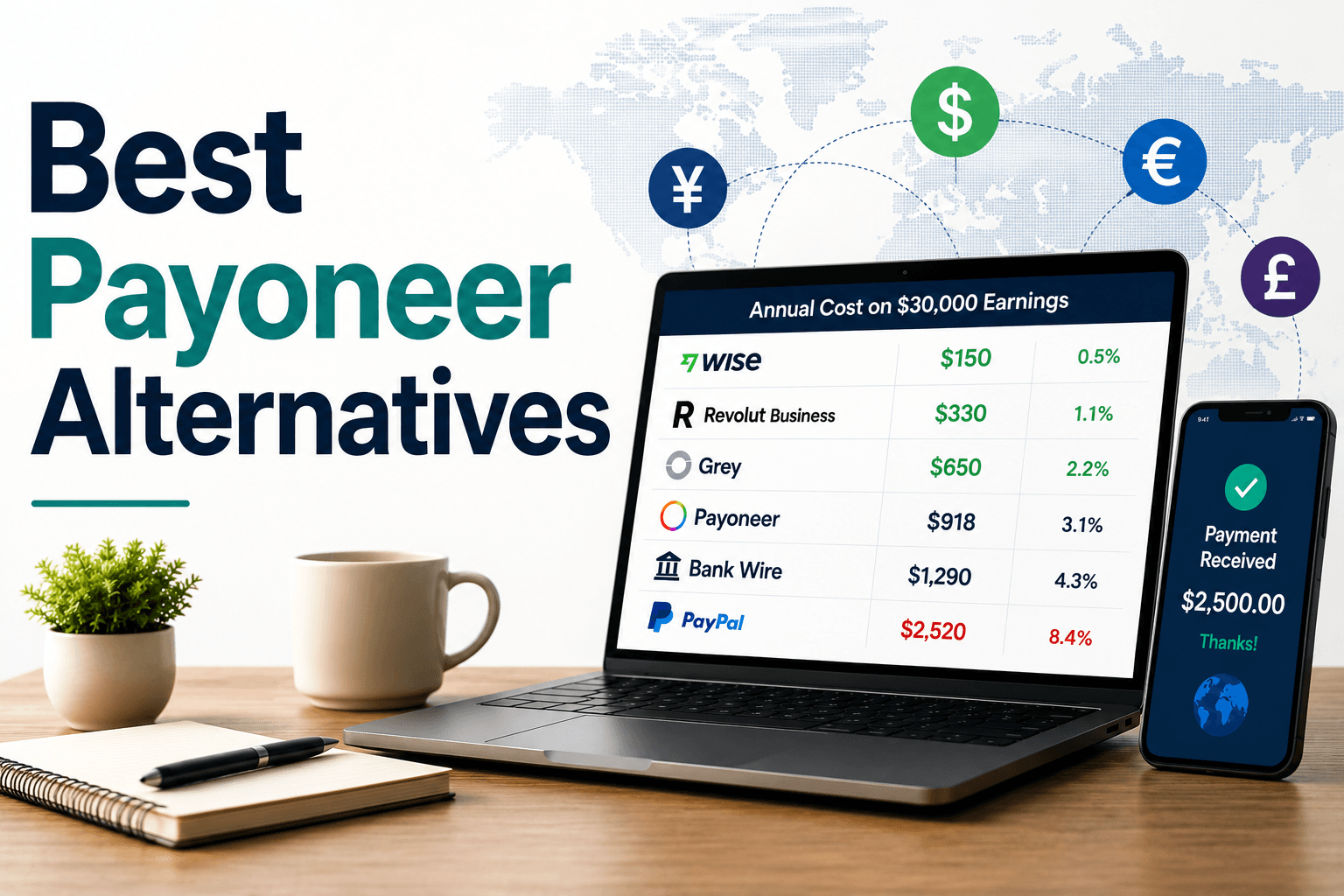
Real cost comparison: $30,000 annual scenario
Fee structures are difficult to compare because every platform charges differently. To make the comparison easier, let’s use the same scenario across every platform:
- You earn $30,000 per year from international clients in USD.
- You receive payments throughout the year.
- You withdraw funds monthly to a local bank account in a non-USD currency.
- All calculations use publicly available fees and typical exchange-rate markups as of 2026.
Payoneer
Receiving payments from clients (1%): $300
Currency conversion (2% average markup): $600
Withdrawals (12 × $1.50): $18
Total annual cost: $918
Effective cost: 3.1% of earnings
Wise
Receiving payments: Free
Currency conversion (~0.5%): $150
One-time account setup fee (year one): $56
Total year-one cost: $206
Ongoing annual cost: ~$150
Effective cost: 0.5–0.7% of earnings
PayPal
International payment receiving fees (4.4%): $1,320
Currency conversion (~4%): $1,200
Total annual cost: $2,520
Effective cost: 8.4% of earnings
Grey
Receiving payments (0.8% plus minimum fees): ~$300
Currency conversion (~1%): $300
Withdrawal fees: ~$50
Total annual cost: ~$650
Effective cost: 2.2% of earnings
Revolut Business (Grow plan)
Subscription fee (€25/month): ~$330
Receiving payments: Free or minimal in most cases
Currency conversion: Minimal during weekday exchange windows
Total annual cost: ~$330
Effective cost: 1.1% of earnings
Direct bank wire transfers
Receiving fees (12 × $20): $240
Currency conversion (3.5% average bank markup): $1,050
Total annual cost: $1,290
Effective cost: 4.3% of earnings
What the numbers mean
The biggest takeaway isn’t that one platform is universally better than another. It’s that currency conversion usually costs more than receiving or withdrawal fees.
In this example, a freelancer earning $30,000 annually would spend roughly $150 with Wise and $2,520 with PayPal. That’s a difference of $2,370 every year.
Over five years, assuming income stays flat, that gap grows to nearly $12,000. If your income increases over time—as it hopefully will—the savings become even more significant.
That’s why it’s worth looking beyond headline fees. The platforms with the lowest visible fees aren’t always the cheapest. In many cases, the real cost is hidden inside the exchange rate.
Choose the right Payoneer alternative
The right choice depends on where you’re based, where your clients are, and how you work.
Suppose you’re based anywhere and want the lowest fees: Wise. The setup fee pays for itself within the first month for most freelancers. The exchange rate transparency and local account details are the best combination available.
If your clients insist on PayPal: Keep a PayPal account for receiving, but withdraw to Wise as quickly as possible. Don’t convert inside PayPal.
If you’re in Nigeria, Ghana, or other African markets, Grey provides the local account details you need, with an interface built for your needs. Compare fees carefully against Cleva and Raenest (GeegPay), which have competitive pricing in that market.
If you’re based in Europe and most clients pay in EUR: Revolut Business at €25/month. Free SEPA transfers and interbank FX rates make it the strongest option for the European market.
If you’re running an agency or processing $50K+/year: Airwallex, but account for the undisclosed 0.3% receiving fee in your cost calculations. The accounting integrations and local account breadth are worth it at scale.
If you sell productized services through a website: Stripe, paired with Wise for holding and converting funds.
If you have a few large established clients paying $5K+ per project: Direct bank wire in the same currency, with Wise for cross-currency needs.
You don’t have to pick one. Most experienced freelancers run two or three platforms, depending on client preference and payment size. The goal is to know which tool is the cheapest for each situation, not to find a single platform that handles everything.
Frequently asked questions about Payoneer alternatives
What’s the cheapest Payoneer alternative for freelancers?
Wise has the lowest total cost for most freelancers receiving international payments. The one-time setup fee of $31 is the only recurring cost — after that, you pay conversion fees starting at 0.47% with no markup on the exchange rate. On $30,000 in annual income, Wise typically costs $150–$200/year in total fees. Payoneer’s current structure costs most international freelancers $800–$1,000+ on the same volume.
Can I use Wise to receive payments from Upwork or Fiverr?
Not directly. Upwork and Fiverr offer their own withdrawal options, including local bank transfers, PayPal, and Payoneer. Once funds are in your Payoneer or PayPal account, you can transfer them to Wise to take advantage of better exchange rates. Many freelancers use Payoneer or PayPal solely as intermediaries to receive marketplace payments, then move everything to Wise for storage and conversion.
What happens to my Payoneer account if I switch?
You don’t need to close your Payoneer account to use an alternative. Run both in parallel for a month or two. Move clients who are flexible to your new preferred platform. Keep Payoneer active for marketplace integrations or clients who won’t change. If you drop below the $2,000 annual receiving threshold, either keep activity above it or close the account to avoid the $29.95 fee.
Which Payoneer alternative is best for Nigerian freelancers?
Grey and Cleva are the two most commonly compared options for Nigerian freelancers in 2026. Grey has a longer track record and multi-currency support (USD, GBP, EUR), while Cleva offers zero conversion markup and zero withdrawal fees to local banks for USD. If you receive primarily in USD, Cleva’s fee structure is hard to beat. If you have UK or European clients, Grey’s multi-currency accounts give you more flexibility.
Is it safe to switch payment platforms mid-project?
Yes, but communicate clearly with clients before changing payment details. Send your new account information on a fresh invoice with a note explaining the change. Don’t switch mid-invoice (i.e., don’t send an invoice with one set of payment details and then email different details later—that pattern is used in payment fraud and may alarm clients). Give at least two weeks’ notice before expecting payments to a new account.
Do these platforms work for freelancers who accept stablecoins or crypto?
None of the platforms on this list natively supports crypto receipts. If you want to accept USDC or other stablecoins, you’ll need a separate crypto wallet (Coinbase, Kraken). The advantage is low transfer fees; the friction is that fewer clients are set up to pay this way, and converting to fiat still carries its own costs. For most freelancers, traditional platforms are simpler until crypto payment adoption grows further.
Pricing verified June 2026. Fee structures change, so confirm current rates on each platform’s pricing page before making a decision.