
There’s a specific kind of tired that comes from doing everything right and staying invisible.
You hired the writer, did the keyword research, and published on schedule. But when you Google the terms you targeted, your website isn’t showing up anywhere.
That’s a fair thing to be frustrated about, and it’s also a solvable one.
I’ve written SEO content for B2B SaaS companies for over five years. In that time, I’ve watched teams burn whole quarters guessing at this problem.
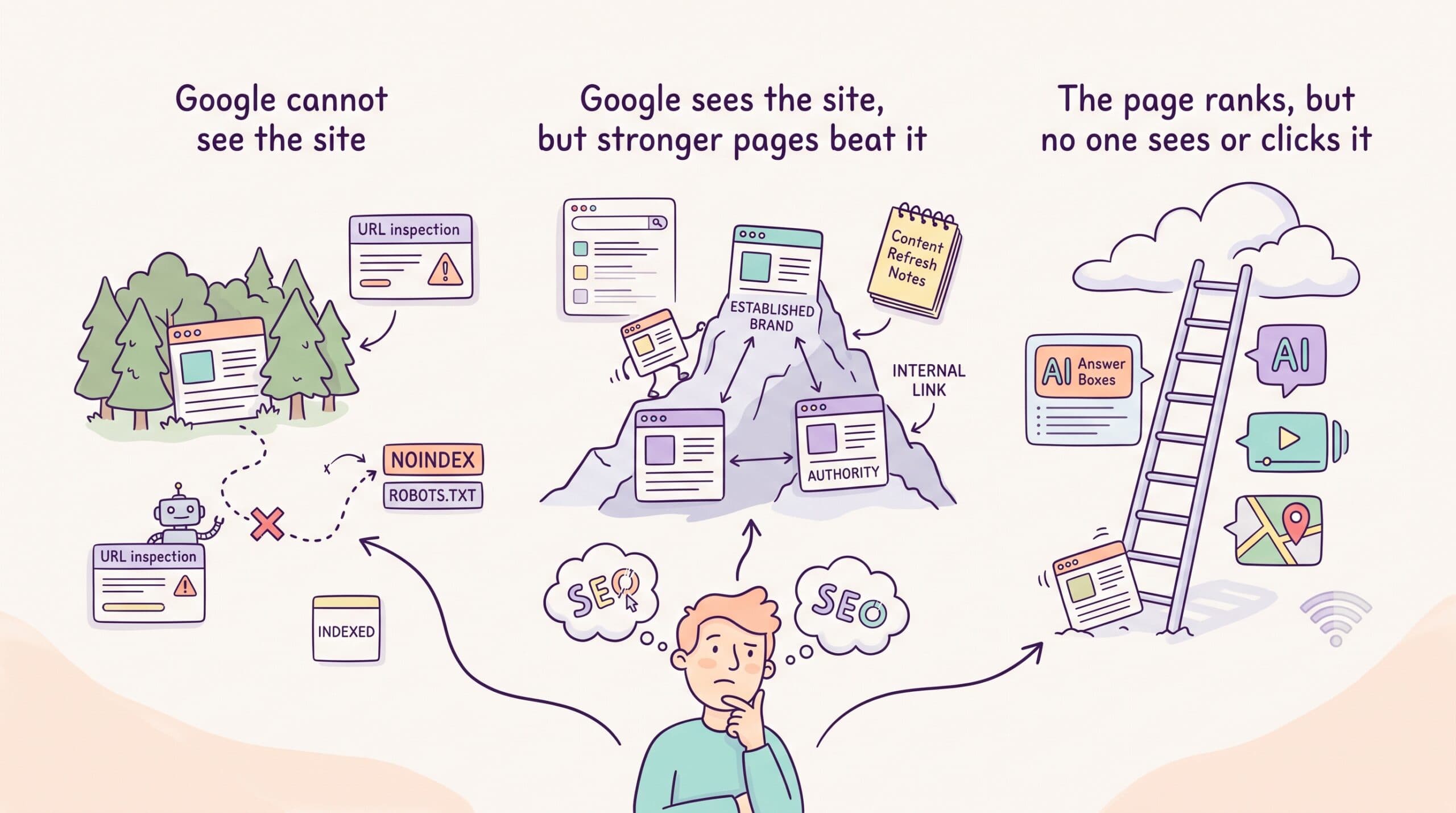
However, in my experience, the frustration of your website not showing on Google typically falls into three buckets:
- Google never indexed your pages
- Your indexed pages lose to stronger ones
- You rank somewhere nobody looks
Each problem has a different fix, and this guide shows you how to work out which one you have before you spend another dollar fixing the wrong thing.
Before you fix anything, find out which problem you have
Fifteen reasons sound like a lot. The good news: you don’t have fifteen problems. A site typically has two or three. Thirty minutes with free tools will show you where they sit.
Start with a ten-second check.
Search Google for site:yourdomain.com with nothing else.

If pages show up, Google has indexed your site. Your problem lives in Bucket 2 or 3. If nothing shows up, Google doesn’t have your site, so go straight to Bucket 1.
To find individual missing pages, run the same check with the full URL.
Next, scope the damage. A whole site that never showed up points one way. One stubborn article points to another. A sudden disappearance points somewhere else again. Note which one describes you.
Then run two checks in Google Search Console:
- URL Inspection. Paste in the page that should be showing. The tool tells you whether Google has indexed it and flags any crawl problems.
- Performance report, filtered by page. Search Engine Land’s diagnostic guide recommends checking whether the page gets impressions. Impressions with no clicks mean you rank, just too low for anyone to see you. Zero impressions mean you likely don’t rank at all.
Here’s how the results map to the rest of this article:
| What you see | Your bucket | Jump to |
| Page not indexed, or crawl errors | Google can’t see your site | Reasons 1–4 |
| Indexed, but zero or few impressions | Google sees you, but other pages beat you | Reasons 5–12 |
| Impressions and decent positions, weak results | You rank, but it isn’t paying off | Reasons 13–14 |
Bucket 1: Google can’t see your site
Google has to crawl and index your pages before any other SEO work can pay off. Ahrefs studied around 14 billion pages and found that 96.55% get zero traffic from Google.

Some of these fail due to poor content. A big chunk also fails because the site wasn’t set up correctly.
1. Your pages aren’t indexed
Google finds pages by crawling links and sitemaps, then stores them in its index. A page outside the index can’t rank, no matter how good it is.
The sneakiest cause is a stray noindex tag left over from launch. A developer blocks the staging site, and the block ships to the live site. Three months later, your team is polishing content that Google was told to ignore. I’d check for this first because no one ever suspects it.
Two less pronounced causes catch people out, too.
Timing: Google’s own help doc says indexing a new page or website can take a couple of days to a few weeks. A post published on Tuesday might not get indexed until Thursday or even later.
And duplicates: when two of your URLs carry near-identical content, Google picks one and drops the other. It doesn’t always pick the one you want.
How to fix it:
- Run your key pages through URL Inspection
- Check the page source for <meta name= “robots” content= “noindex”>
- Open robots.txt and look for blocked folders
- Submit your sitemap to Search Console if you haven’t already
Indexing fixes take days, so this is the fastest win on the list.
2. Technical issues block crawling or rendering
Google has to open a page and read its content before it can add it to search results.
Sometimes, the URL exists, but Google cannot load it well enough to understand what is there.
A few problems can cause this:
- Server errors: Google visits the page and gets an error instead of the content.
- Redirect chains: The URL sends Google through several other URLs before reaching the final page.
- Broken internal links: Links on your site point to pages that no longer exist.
- JavaScript problems: Important text or links only appear after a script loads, and Google cannot load that script.
- Very slow pages: The page takes so long to respond that crawling becomes harder.
- Login or firewall blocks: The page works for your team but blocks Googlebot or visitors outside your network.
You may not notice these issues when you open the site yourself. Your browser might load a cached version, or the problem may only affect some pages.
Start with the page’s URL Inspection report in Google Search Console.
Click TEST LIVE URL, then check whether Google can access the page and see the main content. If the text, headings, or links are missing from the rendered view, you may have a technical issue.

You should also check whether the page returns the right status code:
- 200 means the page loaded normally
- 301 or 302 means the page redirects
- 404 means the page does not exist
- 500 errors point to a server problem
How to fix it:
Start with Google Search Console. Use the live URL test to see whether Google can open the page and read the main content. If key text or links are missing, the issue may lie in the way the page loads.
Next, crawl the site with Screaming Frog or a similar tool. Pay most attention to broken links, long redirect chains, server errors, and pages Google cannot reach.
A crawl may return hundreds of warnings, but many of them will be minor. Focus first on anything that stops Google from opening, reading, or finding your important pages.
Core Web Vitals are worth checking when the site feels slow, but speed is rarely the only reason a page doesn’t show up in search. When the same error appears across many pages, bring in a developer. That usually points to a broader template, server, or JavaScript issue rather than a problem with a single article.
3. Your site is too new to have earned trust
This one stings because you did nothing wrong.
Google has no history with a new domain, no link signals, and no proof that your content helps searchers.
So it waits. Ahrefs’ ranking-age study found that only 1.74% of new pages reach the top 10 within a year. The average #1 result is five years old.
There’s a hopeful footnote in the same study. Of the new pages that reached the top 10, 40.82% did so within a month. New pages can win fast when the keyword fits the site’s strength.
How to fix it:
Waiting alone won’t do it. While the site ages, go after long-tail keywords you can win now. Publish on a schedule and build the internal links.
4. You’ve picked up a manual action
A manual action is a penalty from a human reviewer at Google, often for spammy tricks like bought links.
Manual actions are rare, but when they do occur, they are serious. The good news is that Search Console will tell you what type of issue Google found and whether it affects one section or the whole site.
How to fix it:
Open the Manual Actions report in Search Console. If it’s empty, and it almost certainly is, cross this off and stop worrying about it.
When an action appears, read the message carefully. Fix the issue across every affected page before asking Google to review the site. That could mean removing spammy pages, cleaning up paid or manipulative links, or changing a practice that broke Google’s rules.
Once the work is complete, click Request review. Explain what caused the problem, what you changed, and how you checked that the issue is gone. Google says most reviews take several days or weeks. Link-related cases can take longer. Do not send another request while the first one is still being reviewed.
Even after Google removes the action, your old rankings may not return immediately. The site still has to compete with the pages that now rank above it.
Bucket 2: Google sees your site, but other pages beat it
You’re in this bucket when Search Console says the page is indexed, but it gets few impressions or appears far down in the results.
Google can open the page and include it in search. It doesn’t see it as one of the strongest answers for the keyword yet.
The cause usually sits in the page itself or the signals around it. You may be targeting a keyword that is too competitive, using the wrong content format, offering little that is new, or giving Google too few links and related pages to understand the topic.
The sections below will help you find which of those problems is holding the page back.
5. Your keywords are beyond your site’s authority
Each keyword is its own contest, and some contests your site can’t enter yet. If your page isn’t in the same weight class as the pages that rank, the keyword is likely too hard for you.
A new SaaS site chasing “CRM” is up against Salesforce, a site with millions of backlinks. The same site chasing “CRM for nonprofit volunteer management” is up against a handful of thin pages that it can beat this quarter.
How to fix it:
Google your target keyword and look at who ranks.
If they’re all household names, move down to long-tail keywords your buyers already search for. Win those first, then climb.
6. Your page doesn’t match search intent
Google tries to show the type of page that best answers the search.
If your page uses the wrong format, it may struggle even when the writing is strong.
A common B2B example is a product page targeting “how to onboard remote employees.” Someone searching for that phrase is likely looking for a guide they can follow. If Google’s first page is full of step-by-step articles, a feature page asking for a demo is unlikely to compete.
The same problem can happen when:
- A blog post targets a product keyword
- A service page targets a definition
- A short explainer targets a query that expects a detailed guide
- A product page targets a comparison search
How to fix it:
Search for the keyword and review the top five results.
Look at the page type and structure. Are they guides, listicles, comparison pages, templates, or product pages?
Use that pattern as a clue. Your page should meet the same need while giving the reader better examples, clearer advice, or more useful product context.
When the current page serves a different intent, do not keep forcing it. Refresh it with the correct search, or create a separate page that matches the query.
7. You don’t have a dedicated page for the keyword
Google ranks individual pages.
That means your site needs a single clear page that addresses each important search intent. Mentioning the same topic across several articles does not always give Google a strong page to rank.
SaaS teams often expect the homepage to do too much. A company may want to rank for “customer feedback software” even though its homepage primarily explains the brand, product, and broader value proposition.
Someone searching that term is likely comparing tools. They may expect product options, buying criteria, use cases, and a clear explanation of what to look for. If the homepage does not answer those questions, Google may choose a more focused page instead.
How to fix it:
List the searches that matter most to your business, then match each one to the page that should answer it.
Look for two problems:
- Important searches with no suitable page
- Several pages trying to answer the same search
Create a new page when there is a genuine gap. When two pages serve the same intent, strengthen one and reposition or merge the other.
You do not need a separate URL for every keyword variation. One strong page can rank for several related terms when they all point to the same reader need.
8. Your content isn’t better than what’s ranking
Google already has plenty of pages covering most topics.
If the first ten results give the same advice in the same order, another version of that article will struggle to stand out. Adding 800 more words will not change much.
Your page needs something the reader cannot find elsewhere.
That might be screenshots showing the process, examples from your customers, or input from someone who knows the subject well.
Reviews and comparisons are stronger when the writer has used the product. Internal data can help too, even when it comes from a small customer survey or a few sales calls.
When I broke down Loom’s SEO strategy, the pages with the strongest growth had details competitors could not reproduce by rewriting the search results. They were built around the product, the audience, and the company’s own knowledge.
That is a stronger way to show E-E-A-T. Google uses the term to describe experience, expertise, authoritativeness, and trustworthiness. A bio may tell readers that you know the subject. Specific examples help prove it.
How to fix it:
Read the five strongest results for your keyword and note what they all repeat. Then find one useful thing your company can add that the other articles cannot.
It could come from your product, customers, sales team, or subject-matter experts. Build the update around that insight rather than making the article longer for its own sake.
9. Google can’t see your topical authority
One useful article can rank on its own. It has a better chance when the rest of your site also answers the questions people ask around that topic.
Say your product helps companies track AI visibility. A single post on “AI brand monitoring” provides Google with limited context. A connected set of pages on AI citations, prompt tracking, reporting, and content optimization makes the site’s focus much clearer.
Internal links connect those pages. They help Google find them and show which article covers the main topic. They also give readers an easy next step when they need more detail.
Each page in that set still has to be worth ranking on its own, which is the job of writing SEO content that ranks and converts.
How to fix it:
Choose a topic closely tied to your product, then list the related questions your buyers ask.
Create pages only when each question needs its own answer. Link them with clear anchor text, and point the supporting articles back to the main guide.
Do not build a cluster by splitting one idea into fifteen thin posts. A smaller set of useful pages will serve readers better and be easier for your team to maintain.
10. Your site structure buries your best pages
A page with no internal links pointing to it is called an orphan page. Google has fewer paths to find it and less reason to show it. Orphans pile up on their own: old posts fall out of the navigation, and no one updates old posts to link to new ones.
Weak structure also makes your own pages fight each other. SEOs call it cannibalization: two of your pages chase the same query and split the traffic.
If you have both “best customer feedback tools” and “top customer feedback software” as separate posts, Google may show neither.
How to fix it:
Crawl your site and list pages with zero internal links, then link to the important ones from related posts. For pages competing with each other, merge the weaker into the stronger and redirect.
11. Your pages have no backlinks
Backlinks are links from other websites to yours. They help Google discover pages and can indicate that others see the content as worth referencing.
A page chasing a commercial keyword with zero referring domains, against pages with fifty, is bringing a knife to a gunfight.
If the pages above you have links from respected industry sites and yours has none, content quality may not be enough to close the gap. Google has more outside evidence supporting those pages.
That does not mean you should start buying links.
A backlink cannot fix a page that targets the wrong search intent or offers weak advice. Poor link schemes can also create a much bigger problem than the one you started with.
How to fix it:
Start by creating something people have a reason to cite.
Original data can work well, so can a useful template or a free tool that helps people complete a task. Strong guides may also earn links when they include examples or insights that other writers want to reference.
Once the page is ready, promote it through digital PR or expert contributions. Guest posts can help, too, when they appear on websites your buyers already trust.
Focus on relevance rather than volume. One good link from a respected site in your space can be more useful than dozens from unrelated blogs.
12. You’re publishing without a strategy
Publishing more pages will not help much when each one targets a different audience, problem, or stage of the buyer journey.
This often happens when teams chase high-volume keywords or write about whatever feels interesting that month. After a while, the blog has dozens of posts but no clear topic depth. Only a few of those pages support the searches that matter to the business.
Traffic can hide the problem.
A broad how-to article may bring thousands of visits and very few buyers. While a comparison page with lower traffic may drive more demos because the reader is already considering their options.
How to fix it:
Start with the searches closest to a buying decision. Look at comparison terms, alternatives, pricing questions, product categories, and the problems your product solves.
Then use broader educational articles to support those pages. They can build topic depth, answer earlier questions, and guide readers toward the next step.
Plan those pages around buyer intent and business value, the two tests I use when creating bottom-funnel content that drives revenue.
Before adding another topic to the calendar, ask which buyer it serves, what question it answers, and where the reader should go next.
Bucket 3: You rank, but it isn’t paying off
The strangest version of this problem is the one where nothing is technically wrong. Your pages are indexed, they rank, and the results still disappoint.
These three causes show up again and again.
13. You’re stuck on page two
A page sitting in positions 11 to 20 is close to useful traffic, but most searchers will never reach it.
That can be frustrating, especially when the page once ranked higher. The drop may come from a change in search intent, a stronger competitor, or content that no longer feels current.
SaaS articles age quickly when screenshots, pricing, and product names change.
How to fix it:
Search the keyword and read the pages now ranking above yours.
Look for sections where those pages explain better, questions your page misses, and examples that need updating. Replace old screenshots, refresh product details, and add internal links from relevant pages on your site.
Keep the parts of the article that still match the search. The goal is to strengthen the page around the queries it already reaches, not rewrite it into a different topic.
14. AI Overviews and SERP features sit above you
A high ranking does not always mean people will see your page first.
AI Overviews, People Also Ask boxes, videos, and other search features can push organic results further down the screen. Ahrefs found that AI Overviews were linked to a much lower click-through rate for the top organic result.
That does not make the ranking worthless.
Your page can still earn visibility inside an AI answer or give readers a reason to click when the summary is not enough. Clear answers, useful examples, and specific claims make the page easier for both people and AI tools to understand.
How to fix it:
Search for your target keyword and see what appears above the organic results.
When an AI Overview shows up, check whether your page answers the main question early and clearly. Add useful detail that the summary cannot cover, such as product examples, original data, screenshots, or clear limits.
You can also add FAQs when they answer real follow-up questions. Do not force them in just to make the page longer.
Then track more than rankings. Watch impressions and clicks in Search Console, and use an AI visibility tool to see whether your brand or content appears in AI answers. If it doesn’t, start with the changes that help pages show up in ChatGPT, like a direct answer near the top and explicit product names.
The same habits, like clear headings and self-contained answers, are the core of optimizing content for AI search.
How long each fix may take
SEO fixes don’t all move at the same speed.
A crawl issue may clear once Google visits the page again. A content refresh can take longer. Building trust around a new topic often takes months.
Use these ranges to set expectations with your team.
| Fix | Rough time to see movement |
| Indexing or crawl fix | A few days to a few weeks |
| Refreshing a page-two article | A few weeks to a few months |
| Publishing new content for a realistic keyword | Around three to six months |
| Building stronger topic coverage | 6–12 months |
| Earning authority through backlinks | 3–18 months |
These are planning ranges, not deadlines.
The result depends on the site, the keyword, and the pages already ranking.
Anyone promising page one in 30 days is describing either an indexing fix or a fantasy.
SEO pays off the way the gym does: slowly, then obviously, and only if you keep showing up. I say that as someone with an on-again, off-again gym habit, so no judgment.
Start the fast fixes today and let the slow ones build behind them.
A small technical fix may show up quickly. Moving into the top ten in a competitive search usually takes more work.
Start with the fixes you can confirm today. Remove crawl blocks, update pages that already get impressions, and improve internal links.
Let the slower work, such as building topic depth and earning backlinks, continue in the background.
When to fix it yourself and when to bring in help
Much of this list is self-serviceable.
Indexing checks, GSC reports, and SERP reviews take a free afternoon. A marketing team with some SEO skills can clear Bucket 1 on its own.
Knowing what to do and having the time to do it are different problems, though.
Outside help might be necessary when the bottleneck is time, not knowledge.
Watch for a backlog of high-intent topics no one has time to write, rankings that flatlined a year ago, and refreshes that keep slipping to next quarter. If several of those sound familiar, a SaaS SEO consultant or a freelance writer, like myself, can help.
I’m Nathan, a freelance content writer for B2B SaaS companies. If you ran the checks in this guide, you probably landed in Bucket 2 or 3: pages that lose to stronger ones, page-two posts waiting on a refresh no one has time for, or content that ranks while AI answers take the clicks.
That’s the work I do.
- I refresh posts stuck in positions 5–20 and posts that rank but don’t convert, so you get results in weeks instead of months.
- I write bottom-funnel articles (comparison pages, alternatives, best-of lists) that fix your strategy gap and reach buyers who are already choosing.
- I make content structured for AI Overviews, ChatGPT, and Perplexity, with the product woven into the article rather than bolted onto the CTA.
FAQs about your website not showing up on Google
Why is my website not showing up on Google?
Either Google hasn’t indexed your pages, your pages rank too low to be seen, or you rank for keywords that don’t bring clicks or pipeline.
Run a site:yourdomain.com search to confirm indexing, then compare your content against the current top five results for each target keyword.
How do I get my website to show up on Google?
Confirm your pages are indexed by submitting a sitemap in Google Search Console and removing any noindex tags. Then build one page per target keyword, match the format of what already ranks, and add internal links so Google can find each page.
Why is my website indexed but not ranking?
Indexing makes you eligible; it doesn’t make you competitive. The usual causes are keywords that are too hard for your site, content that misses the search intent, and pages that add nothing beyond what already ranks. Reasons 5 through 12 above cover the fixes.
Can a website rank without backlinks?
Yes, for low-competition and long-tail keywords, especially when the content is clearly the best answer. Commercial keywords with big rivals almost always need links to the page or a strong domain behind it.
Why did my rankings suddenly drop?
The usual causes are a Google update, rivals refreshing their pages, or intent moving away from your format. A site change can also do it: a migration, a stray noindex, a broken redirect. Check Search Console for coverage errors first, then compare the current SERP against your page.
Why does my content rank on page two but not page one?
Google sees your page as relevant, just weaker than the top ten in terms of depth, freshness, links, or intent match. Pages on page 2 respond well to refreshes: close the content gaps, update stale sections, and add internal links pointing to the page.
Does AI-generated content hurt rankings?
Not by itself. Ahrefs analyzed 600,000 pages and found Google neither punishes nor rewards AI content as a category. Content that copies what already ranks is what fails, whoever or whatever wrote it, because it runs into reason 8.
How often should I update old blog posts?
Review high-value pages every 6 to 12 months. Start with pages ranking in positions 5 through 20, pages with falling traffic, and anything with dated stats, screenshots, or product references.