
When half your team comes in on Tuesday and the other half on Thursday, things start to slip.
No one knows who has which desk or whether the large conference room is free. So the same three people camp in the same spots, while everyone else gets frustrated.
Archie is a space management platform built to fix that.
It handles desk booking, meeting room scheduling, office floor plans, and occupancy analytics—all from one dashboard. Over 1,000 organizations, including Avison Young, Raiffeisen Bank, and Lululemon, use Archie.
I went through a full product demo with the Archie team and dug into real user reviews to give you an honest picture of what it does well, where it falls short, and whether it’s the right fit for your organization.
Here are my findings.
TL;DR
- Archie is a space management platform covering desk booking, room scheduling, interactive office floor plans, and analytics.
- It works well for mid-sized to large offices with flexible work policies and growing scheduling complexity.
- Archie’s standout features include amenity-based filtering and per-team visibility controls that make hot desking usable.
- The $159/month minimum pricing means it’s not practical for very small teams or offices with just a handful of desks or rooms.
- Archie is one of the most complete and easy-to-use workspace management platforms available, especially when you have the scale to justify it.
What is Archie?
Archie is a cloud-based workspace management platform that helps organizations manage their spaces, resources, and people, with tailored solutions for both office teams and coworking operators. In this review, I’m going to focus on Archie Desks and Rooms.

What sets Archie apart from generic booking tools is its depth on the admin side. You can set check-in policies, manage team neighborhoods, control desk and room visibility by department, and track occupancy data over time.
Per my observations and published success stories, Archie is a great fit for organizations with more than 100 employees (users). The reason is that these are the companies most likely to face real scheduling complexity.
Conversely, Archie is not a good fit for solo entrepreneurs, micro-teams, or organizations with just one or two rooms to manage.
The minimum pricing tiers reflect that as we’d consider next.
Archie pricing
Archie charges per desk or per room per month, with separate pricing tabs for each product. All pricing verified on Archie’s pricing page as of May 2026.
Desk booking pricing
| Plan | Price | Minimum | Best for |
| Starter | $2.80/desk/month | $159/month | Small to mid-sized orgs needing core desk management |
| Pro | $3.50/desk/month | $249/month | Larger companies with multi-location or advanced needs |
| Enterprise | Custom | Custom | Large-scale deployments with compliance or custom requirements |

Starter includes visual floor plans, web and mobile app, colleague schedule visibility, QR check-ins, seat assignment, and occupancy analytics. It covers one location.
Pro adds multiple locations, Microsoft Teams and Outlook booking, Slack integration, SSO and SCIM, custom groups and roles, and brand customization. It also includes tailored premium onboarding.
Enterprise adds custom data residency, tailored legal frameworks, migration support, premium API access, white-glove onboarding, and compliance support.
Room scheduling pricing
| Plan | Price | Minimum | Best for |
| Starter | $8/room/month | $159/month | Small to mid-sized orgs looking for a complete meeting room solution |
| Pro | $12/room/month | $249/month | Larger companies with multi-location or advanced needs |
| Enterprise | Custom | Custom | Large-scale deployments with custom requirements |

Starter ($8/room/month, $159/month minimum) covers the core room booking experience. You get web and mobile booking, real-time availability, interactive floor plans, QR code check-in, recurring bookings, basic occupancy analytics, and support for one location.
Pro ($12/room/month, $249/month minimum) adds everything in Starter plus multiple locations, Teams and Outlook booking, Slack integration, SSO and SCIM, custom groups and roles, and brand customization. Also includes tailored premium onboarding.
Enterprise is custom pricing for large-scale deployments needing security and compliance support, custom data residency, premium API access, migration support, and white-glove onboarding.
Note: The room pricing ($8–$12/room) is meaningfully higher per unit than the desk pricing ($2.80–$3.50/desk), which makes sense, given that meeting rooms are higher-value, lower-volume resources.
Is Archie worth the price?
I like the per-desk/per-room model.
If you have 50 desks and 80 employees, you’re only paying for the desks—not for every person in the company. Per-user pricing penalizes team growth, regardless of how much space you actually manage.
On the Starter plan, pricing is also fairly predictable. At $2.80 per desk per month, a 60-desk office costs $168. A reasonable price if your team actually needs a workplace management tool.
That said, it won’t make sense for everyone. If your team is small enough that “just check Slack” still works, a tool like Archie is probably more than you need right now.
The significant pricing consideration is the $159/month minimum. If you have fewer than about 57 desks on the Starter plan, you’ll still pay at least $159, which means your cost per desk is effectively higher. For smaller offices, that could be a dealbreaker.
Archie’s key features
Desk booking with amenity filtering
The core desk booking experience is simple to follow.
Users open a floor plan view, see which colleagues are scheduled to come in on a given day, and book a desk nearby.
What makes it useful, rather than just functional, is the amenity filtering.
You can filter specifically for desks with a USB-C monitor, a standing desk setup, a quiet zone designation, video conferencing hardware, or whatever attributes you’ve tagged in the system.

This feature comes in handy for employees with specific equipment. You can also book recurring desks and see multi-location availability if your organization spans offices—all from the web app, mobile app, or directly inside Microsoft Teams.
Meeting room booking
Room booking works the same way as the desk system, but for conference rooms and shared spaces.
Employees can reserve a room from the web app, mobile app, the Archie Rooms app on a display outside the room, a kiosk, or by scanning a QR code.

Bookings sync automatically with Outlook, Google Calendar, and Microsoft Teams, so your calendar is always up to date.
You can filter by room size, location, equipment (such as screens and video conferencing gear), and capacity before committing.
Archie also supports recurring meetings, so weekly standups or regular team check-ins don’t require manual rebooking.
For a broader look at choosing the right room-booking solution, Archie’s meeting room booking software guide is a useful reference.
No-show protection and smart booking rules
Ghost bookings are one of the biggest frustrations in hybrid offices.
Someone reserves a desk or room, doesn’t show up, and it sits empty while others can’t book it.
Archie addresses this with configurable check-in policies and auto-release. Employees check in via QR code, mobile app, Slack, or Teams.

If nobody checks in within the defined window, the space is automatically released.
Beyond no-shows, admins can set booking limits, approval rules, buffer times between meetings, and priority access for specific teams.

That combination of controls makes the system reflect how a real office actually operates, not just how you wish it did. This is especially relevant for organizations thinking through meeting room occupancy tracking and optimization.
You can learn more about how Archie handles meeting room no-shows or ghost bookings:
Team visibility controls and department neighborhoods
On the admin side, one of the more thoughtful features is the ability to control which desks and rooms are visible to which teams.
For instance, admins can configure Archie so that the Marketing team can only book rooms or desks on the second floor.

This control helps organizations avoid a free-for-all where everyone competes for the same spots. It also makes the floor plan easier to navigate rather than overwhelming.
You set it up once in the admin panel, and it applies automatically based on each user’s group.
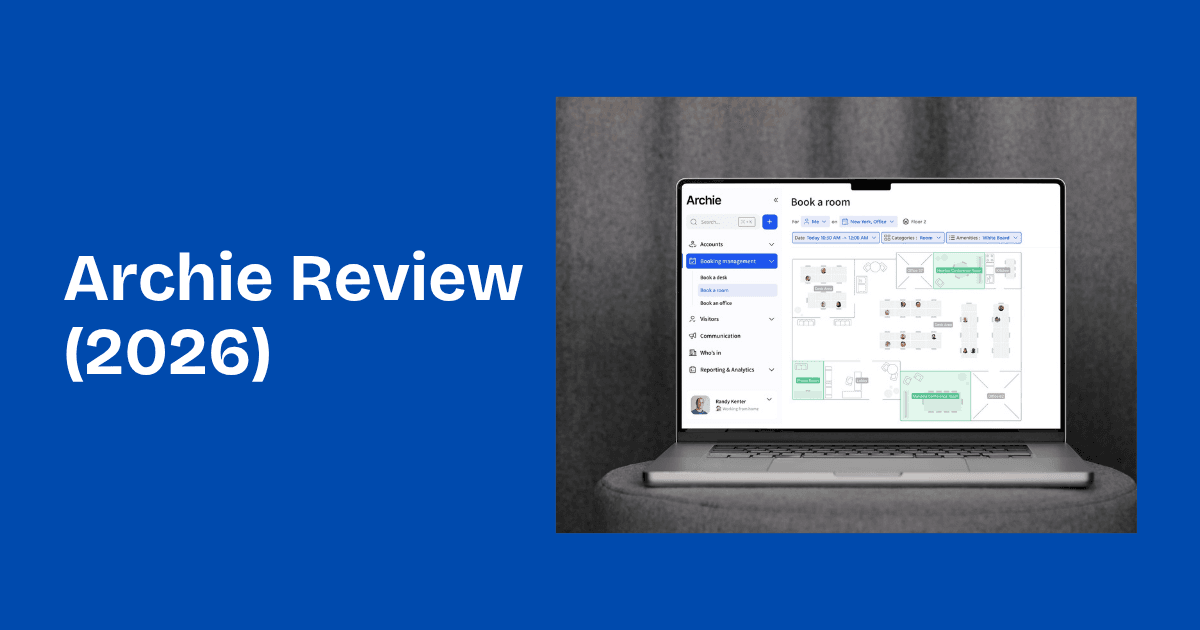
Interactive floor plans
You upload your office map and customize it directly in Archie.
Desks, rooms, amenities, and zones are all draggable and editable without developer involvement.

The floor plan serves as the booking interface for employees, making it more intuitive than a list-based system, especially in larger offices where spatial context matters.
Currently, there are only 2D floor plans.
Occupancy analytics
Archie tracks desk and room occupancy over time, showing which spaces are most used, peak days and hours, average booking length, and attendance by team.
For operations and facilities managers making real estate decisions, this is the layer that turns booking data into actionable insight.

If you want to understand how to use that data effectively, the Archie blog has a solid explainer on workplace analytics and a more specific piece on measuring desk occupancy.
Integrations
Archie has native integrations with Microsoft Teams, Outlook, Slack, Google Calendar, Zoom, Kisi (door access control), IronWifi (guest WiFi), Stripe, Xero, QuickBooks, and others—30+ in total, with Zapier and an open API for anything not natively covered.
Teams and Outlook work as full booking experiences, not just notification channels. If your team already lives in Microsoft 365, the Archie for Microsoft integration lets you book desks and rooms without leaving your existing tools.
Slack-first teams get the same treatment as the Archie for Slack integration, which handles bookings and check-ins directly where your team already works.
What I like about Archie
- The amenity filtering is more useful than it sounds. Most desk booking tools let you pick a desk on a map. Archie lets you filter by what the desk actually has. For teams with varied setup needs—some people need dual monitors, some need accessibility accommodations, some just want a quiet corner—this turns booking from a guessing game into something functional.
- Per-resource pricing is fairer for hybrid teams. If 40% of your employees are remote, paying per user means you’re subsidizing unused capacity. Charging per desk and per room aligns costs with the physical resources you’re managing.
This is one of the reasons Archie tends to compare favorably against per-user desk booking tools at mid-market scale.
- The admin controls are deep without being complex. The admin controls are deep without feeling complex. Features like group-based visibility, check-in policies, buffer times, booking approvals, and custom roles help the system match how a real office actually runs.
This feature makes Archie stand out by giving admins the flexibility to manage space effectively without adding friction.
- Setup is fast. Getting started doesn’t require extensive training, and Archie’s own documentation puts most teams live within a few days. The onboarding team assists with SSO, SCIM, and initial configuration on Pro and Enterprise plans.
What could be better
- Advanced configuration has a learning curve. Several users mention it took time to fully understand the more advanced configuration settings. The features are there, but require upfront investment to set up correctly.
Archie’s support team consistently earns high marks for its help, but the self-serve setup for complex workflows isn’t always straightforward.
- Dashboard reporting has limited customization. You can’t create fully custom dashboards, unlike some enterprise tools.
- Floor plans are limited to 2D, with no support for 3D views, which some tools offer.
Who should use Archie?
Archie is best for:
- Mid-sized to large hybrid offices (50+ desks) where hot desking coordination has become genuinely chaotic
- Multi-location organizations that need one system across multiple offices
- Companies running return-to-office policies and needing visibility into actual attendance patterns
- Teams already deep in Microsoft 365 or Slack who want booking embedded in existing workflows
Skip Archie if:
- Your team is small enough that informal coordination still works
- You only have one or two rooms and have no hot desking needs
- You need deep integrations with payment systems outside Archie’s native stack
- You want a self-serve setup with no onboarding process. Archie works best when you invest in the initial configuration
Only 40% of companies still have a 1:1 desk-to-employee ratio, down from 56% the year before. As that gap grows, tools like Archie become less of a nice-to-have and more of a practical way to manage shared space.
How Archie compares to alternatives
Archie vs. Envoy
Envoy expanded from visitor management into desk and room booking, but space management isn’t where it’s strongest. Booking features like amenity filtering, team neighborhoods, and auto-release policies are less developed than Archie’s.
For teams where desk and room booking is the primary need, Archie is the more purpose-built choice.See the full comparison.
Archie vs. Skedda
Skedda is a solid, flexible booking platform with strong scheduling logic and availability rules. For pure space booking, it holds up well. Where it falls short is the broader workspace layer. There is no colleague schedule visibility, lighter analytics, and visitor tools.
If you need booking, real occupancy insights, and calendar integration, Archie covers more ground.See how Skedda compares against Archie.
Archie vs. Robin
Robin’s desk booking and analytics are solid, but custom quotes and per-user pricing tie costs to headcount rather than to the space you manage. For hybrid teams, that quickly becomes inefficient. See how Archie stacks up.
My experience with Archie
I went through a full demo of the desk and room booking solution with the Archie team. A few things stood out that I wouldn’t have picked up from the marketing page alone.
The colleague schedule view is more useful than it initially appears. Being able to see who on your team is coming in on a given day—before you book—changes the behavior pattern.
That shift from “where do I sit” to “when should I go in to be near my team” is the actual problem hybrid work created, and Archie is one of the few tools I’ve seen that addresses it directly at the booking layer.
I was also impressed with the check-in policy configuration. The ability to require QR check-in for certain spaces, allow mobile or Slack check-in for others, and auto-release no-shows after a configurable window, all without involving IT, is the kind of admin control that solves real operational headaches.
Ghost bookings in hybrid offices waste meaningful space, and the auto-release mechanism is a direct fix.
While not the focus of the review, I also really liked Archie’s visitor management features. The automation capabilities—different flows for different visit types, e-signature integration, automatic badge printing, emergency evacuation tracking—put it well above what most offices currently use to manage guests.
The one genuine friction point I noticed was this. The admin setup for anything beyond the basics requires time and attention. The power is there, but getting it configured to reflect your specific organization’s rules takes work.
Archie’s onboarding team handles most of this on the Pro and Enterprise plans, but Starter plan buyers should go in with realistic expectations about self-serve setup time.
Final verdict: Should you use Archie?
Short answer? Yes.
Archie is one of the most complete workspace management platforms available for hybrid offices and coworking spaces.
The desk booking experience is thoughtful. The room booking module adds calendar sync, smart booking rules, QR check-in, and no-show protection that covers everything a hybrid office needs to stop wasting meeting space. And the admin controls give operations teams the kind of configuration depth that actually reflects how offices work.
The limitations are real but narrow. The mobile app has gaps. Advanced setup takes time. The minimum pricing tiers rule out very small teams.
For organizations actively managing hybrid work at scale—multiple locations, regular visitors, real space utilization questions—Archie is a strong choice. It’s priced fairly relative to alternatives, consistently rated highly for ease of use and support, and built to handle the coordination complexity of flexible work.
If you have fewer than 50 desks and your current approach is “just Slack us when you’re coming in,” you’re probably not at the scale where Archie makes financial sense yet. When that changes, it’s worth a look.
Schedule a demo to see how Archie fits your workplace setup.
Frequently asked questions about Archie
Is Archie worth it?
For hybrid offices with 50+ desks where desk coordination is causing real friction, yes. The per-resource pricing, combined with the depth of features, delivers strong value compared to per-user tools.
For small teams or offices with minimal booking complexity, the minimum pricing tiers make it harder to justify.
How does Archie’s pricing compare to alternatives?
Archie charges per desk or room rather than per user, which is typically more cost-effective for hybrid teams where not everyone is in the office daily.
Tools like Robin and OfficeSpace use custom pricing and per-user models that scale up quickly as headcount grows. At comparable feature sets, Archie usually comes out cheaper for mid-sized hybrid teams.
Does Archie integrate with Microsoft Teams?
Yes. The Teams integration is a full booking experience. Employees can find and book desks and rooms directly inside Teams and Outlook without switching to the Archie app.
The integration is available in the Pro plan. There’s also a dedicated guide to the Microsoft booking system if you want to understand how the integration works before your demo.
Can I use just one Archie module?
Yes. Desk booking, room booking, visitor management, and coworking software are sold separately. You can start with just the desk booking module, for example, and add visitor management later. Each module has its own pricing.
What’s the learning curve like?
The employee-facing experience is intuitive, and most users pick it up without training. The admin configuration, especially for advanced features like custom visitor flows, check-in policies, and group-based visibility, requires more time. Archie’s support team and onboarding sessions significantly reduce that curve on paid plans.